
By alphacardprocess November 14, 2025
Launching a business in Music City is exciting—and getting your credit card processing set up the right way is one of the most important early moves you’ll make. Done well, it helps you accept payments anywhere, keep costs predictable, and stay compliant with card-brand rules and Tennessee law.
This step-by-step Nashville-specific guide walks you through licenses, picking a processor, hardware and software, pricing models, fraud and chargeback prevention, PCI DSS v4.0 compliance, surcharging/cash-discount options, and day-one to day-90 rollout.
Step 1: Square Away Nashville/Tennessee Basics So you Can Legally Accept Cards
Before turning on credit card processing, make sure your local paperwork is in order. In Metro Nashville–Davidson County, most businesses must obtain a business license from the Davidson County Clerk after registering (if required) with the Tennessee Department of Revenue (TNTAP).
The county’s site provides online links and in-person options, and the Clerk lists business services pages where you can apply and view fees. As of late 2025, license fees differ by whether you’re in Nashville’s Urban Service District (USD) or outside it in the General Services District (GSD).
Next, understand sales tax because it affects how you configure your POS and receipts. Tennessee’s state sales tax is 7%. Davidson County voters approved a 0.5% local option increase effective February 1, 2025, bringing Nashville’s combined rate to 9.75% (7.00% state + 2.75% local).
Set your POS tax tables correctly from day one to avoid customer confusion and audit headaches. The Department of Revenue maintains tools and notices that confirm the change and help you verify address-specific rates.
Finally, decide whether you’ll open in-person, online, or both. Your answer determines whether you’ll need a countertop terminal, a full POS for table service/retail, a mobile reader for pop-ups and festivals, an eCommerce gateway, or an omnichannel platform that unifies everything. Get this scope down on paper now so the rest of your credit card processing setup maps cleanly.
Step 2: Understand How Merchant Accounts and Payment Gateways Work (without the jargon)
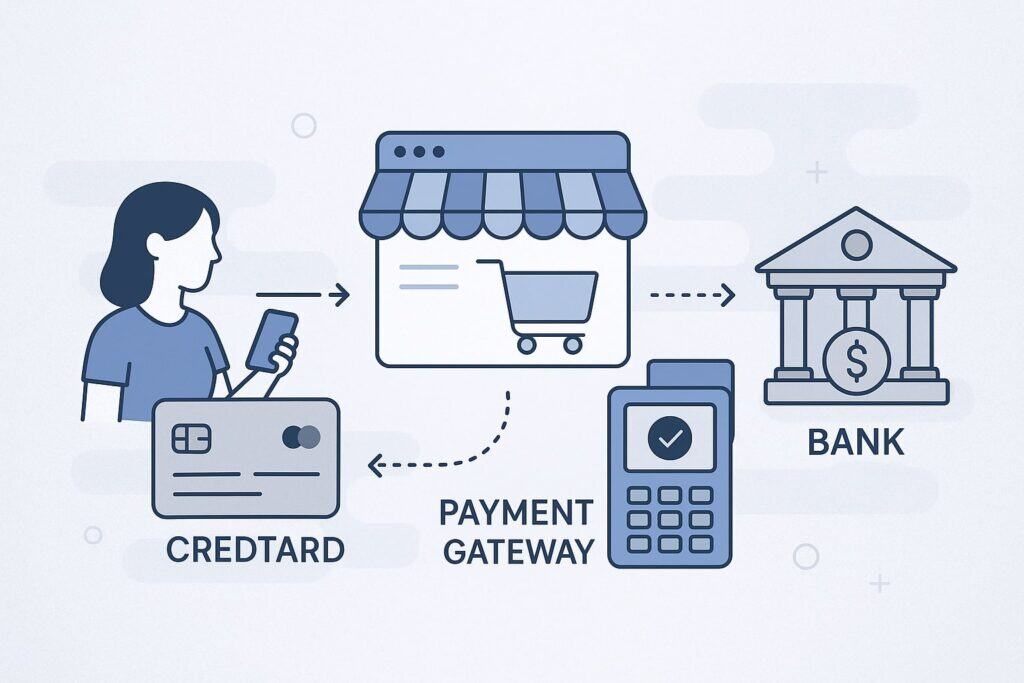
Every business that accepts credit cards needs a pathway to move money from a customer’s card to your bank. Traditionally that meant a merchant account (your dedicated account with an acquiring bank) plus a payment gateway for online transactions. Today, many providers bundle these into an all-in-one solution, but the underlying flow is the same:
- Authorization: Your terminal or website sends the transaction to the gateway/processor, then to the card network, and to the issuing bank for approval.
- Clearing and settlement: Approved transactions are batched and deposited to your business account, minus credit card processing fees.
- Disputes: If a cardholder contests a charge, the issuing bank may open a chargeback; your acquirer notifies you to provide evidence.
Key differences you’ll see in proposals include pricing models (flat-rate vs. interchange-plus vs. tiered), funding times (same day vs. next day), contract terms (month-to-month vs. multi-year with ETF), and hardware ownership (buy vs. lease).
For most new Nashville shops, month-to-month, no ETF, and interchange-plus pricing are a safe starting point because they keep costs transparent and flexible as you grow.
Step 3: Choose the Right Pricing Model and Estimate your Effective Rate

Your goal isn’t the lowest sticker fee; it’s the lowest effective rate over your real mix of transactions. Here’s how the common models stack up:
- Interchange-plus (cost-plus): You pay true card-brand interchange + assessments + a disclosed processor markup (e.g., 0.20% + $0.10). Great transparency and often the best deal at volume or with a card mix skewed to regulated debit.
- Flat-rate: One simple rate (e.g., 2.6% + $0.10) for in-person, another for keyed/online. Easy to budget; may cost more at scale.
- Tiered: Buckets (“qualified,” “mid-qualified,” “non-qualified”). Harder to audit; small businesses often pay more than they realize.
- Membership/subscription: Pay a monthly fee and tiny per-transaction markup over raw interchange. Can be cost-effective if monthly volume is steady and solid.
Estimate your effective rate by modeling a month of likely sales: split by in-person vs. online, average ticket, and card mix (debit vs. rewards credit). If you’ll run many small tickets (coffee cart, food truck), watch the per-transaction fee.
If you run high-ticket invoices (contractors, event vendors), percentage markup matters more. For new Nashville businesses, it’s smart to ask for a sample statement analysis and a no-penalty rate review after 60–90 days when your volume is real.
Step 4: Pick Hardware and Software that Fit Nashville’s Real-world Use Cases

Music City is event-driven. You might sell in a storefront Wednesday, at a festival Friday, and at a pop-up on Lower Broadway Saturday. Choose credit card processing tools that can move with you:
- Countertop terminals: PCI-validated, EMV and NFC (tap-to-pay) capable. Simple and reliable for quick-serve counters, salons, and boutiques.
- Full POS: Inventory, modifiers, tabs, tipping, kitchen printers, and loyalty. Ideal for bars, restaurants, and multi-register retail.
- Mobile readers: Connect to iOS/Android; great for markets, food trucks, and merch tables at venues.
- Virtual terminal: For phone orders, invoices, and back-office billing.
- eCommerce gateway + plugins: If you sell online, ensure the gateway supports your cart (Shopify, Woo, BigCommerce) and tokenizes cards for on-file billing.
Ask about: offline mode for spotty festival Wi-Fi, dual-band or LTE failover, tip and service-charge flows for hospitality, and item-level tax logic for local rates. Nashville’s combined rate is 9.75% in 2025, so your POS should support correct calculation and receipt display across locations.
Step 5: PCI DSS v4.0 Compliance—What Changed and What you Actually Need to do
Every business that stores, processes, or transmits card data must comply with the PCI DSS. Version 4.0 officially replaced 3.2.1 on March 31, 2024, with additional “best practice” requirements becoming required by March 31, 2025.
Even small merchants using SAQ-A or SAQ-P2PE still need to complete an annual self-assessment, maintain policies, and use secure, updated devices. The Council’s countdown and reputable compliance advisories outline timelines you can rely on.
Practical moves for Nashville startups:
- Prefer P2PE-validated or end-to-end encrypted devices and tokenization so you qualify for the shortest SAQ and shrink scope.
- Use strong passwords, multi-factor authentication for your gateway dashboard, and never store card numbers in spreadsheets or emails.
- Patch your POS tablets and routers; segment guest Wi-Fi from POS networks.
- Train staff on how to handle cards, receipts, and chargebacks, and keep a written incident response plan (even a one-pager is better than nothing).
Step 6: Decide on Surcharging, Cash Discounting, or Just Building Fees into Pricing
In 2025, Tennessee permits credit card surcharging, subject to card-network rules and the Tennessee Consumer Protection Act’s transparency requirements. Visa reduced its maximum credit card surcharge to 3% effective April 15, 2023.
Regardless of state law, you must follow card-brand caps and disclosures (e.g., signage and receipt lines, advance registration with networks/acquirer in some cases). Debit cards cannot be surcharged under federal rules.
If you choose a dual-price cash discount program, you must clearly display both cash and card prices—don’t disguise a surcharge.
For Nashville operators, consider the optics in hospitality and entertainment. Tourists may accept small surcharges at venues, but locals may prefer all-in pricing.
If you implement surcharging, train staff, post compliant signage at entry and checkout, configure POS receipts to show the surcharge as a separate line, and register with your acquirer if required by your program.
When in doubt, check your processor’s legal/compliance resources and the Tennessee Attorney General’s consumer protection pages for general enforcement posture under the TCPA.
Step 7: Build your Fraud-Prevention and Chargeback-Response Playbook
Credit card processing isn’t just about approvals—it’s also about preventing losses:
- In-person: Always use chip/tap (never swipe fallback unless you must), compare signatures when prompted, and verify large tips or unusual orders.
- Card-not-present: Enable AVS and CVV checks, 3-D Secure where supported, velocity limits for repeated attempts, and risk rules for high-ticket or out-of-area purchases.
- Refunds: Post a clear policy on receipts and at the point of sale. Offer exchanges or partial refunds quickly to avoid disputes.
- Chargebacks: Keep signed receipts, itemized tickets, delivery proof, and conversation logs. Respond within deadlines; have a single owner (you or your manager) for representations.
Ask your processor for built-in tools such as dispute alerts, order-insight data sharing, and pre-dispute resolution flows. Combine that with staff training and you’ll stop most avoidable losses before they happen.
Step 8: Connect Payments with your Accounting, Inventory, and Payroll
Seamless credit card processing saves hours every week. Look for:
- Accounting sync: Native integrations with QuickBooks, Xero, or Sage that post deposits and fees automatically and reconcile by batch.
- Inventory: Real-time stock counts, purchase orders, and low-stock alerts that reflect online + in-store sales.
- Invoicing/recurring: Tokenized card-on-file for memberships and service retainers, with automated dunning.
- Payroll/tips: Tip pooling, declaration reports, and payroll exports that match your service charge and tip logic in Tennessee.
When you demo POS systems, test the full workflow with sample items, tax rates, and a real card so you can see daily settlement reports and how they hit your accounting system.
Step 9: Negotiate a Clean, Merchant-friendly Agreement
A good credit card processing contract is transparent and portable:
- Term: Month-to-month with no ETF is best for new merchants.
- Pricing: Get interchange-plus markups and pass-through assessments listed explicitly.
- Ancillary fees: Ask for a one-page schedule that lists PCI fees, statement fees, batch fees, chargeback fees, and minimums (ideally none).
- Hardware: Avoid non-cancelable leases; purchase or use month-to-month rentals.
- Funding: Confirm cutoff time for next-day funding; ask about weekend/holiday deposit policies.
Have your rep provide a sample statement illustrating exactly how your rates will look once you’re live. Revisit pricing after 60–90 days when your true volume and average ticket are clear.
Step 10: Implementation plan for a Nashville launch (Day 0 to Day 90)
Week 0–1
- File or verify your Davidson County license and confirm your sales tax setup in POS (9.75% starting Feb. 1, 2025).
- Pick your platform (terminal/POS/mobile/eCommerce) and sign a month-to-month agreement.
Week 2–3
- Install devices, test chip/tap, and connect to a dedicated network (guest Wi-Fi segregated).
- Configure items, tax groups, tips, and receipt/footer text.
- Turn on AVS/CVV, 3-D Secure (if offered), and set user permissions with MFA.
Week 4
- Train staff on checkout, refunds, and how to explain any surcharge or dual pricing to customers. Post signage if applicable.
Week 5–8
- Monitor approval rates and chargeback alerts; adjust risk rules and ticket size limits.
- Enable accounting sync and verify deposit reconciliations.
Week 9–12
- Do a pricing health-check using real data. If your average ticket or card mix differs from assumptions, ask your processor to re-optimize.
Nashville-specific tips for common business types
Restaurants, bars, venues
- Choose POS that supports coursing, tabs, pre-auths, tip prompts, and QR pay at tables. Map taxes correctly to item categories. If you add a service charge for large parties, label it clearly on the receipt and train staff to explain the difference between tips and service charges.
Retail and pop-ups
- Prioritize fast EMV and contactless, barcode scanning, and offline mode. Keep a charged mobile reader plus a hotspot for events. Inventory sync between shop and web is crucial for festival weekends.
Professional services and contractors
- Use invoices with card-on-file and ACH options. Add 3-D Secure for high-ticket invoices, require matching AVS, and collect scope/approval documents to win any future disputes.
eCommerce first
- Lean on a gateway that supports your platform, has tokenization, and offers no-code 3-D Secure. If you also sell at events, choose the same provider’s in-person reader to keep customer profiles unified.
Compliance and signage you should actually print
At minimum:
- PCI policy one-pager (who to contact, how to shut off terminals, and what to do if you suspect a breach).
- Refund policy at checkout and on receipts.
- If surcharging: clear signs at entry and POS, printed surcharge line on receipts, and card-brand-compliant messaging; respect the 3% Visa cap and don’t surcharge debit.
Keep device serials and your processor’s 24/7 support number in a drawer or saved on your phone for fast troubleshooting on busy nights.
How to keep your effective rate low all year
- Right-size your plan: If you add online ordering or a second location, re-quote processing rather than bolting on pricey add-ons.
- Update hardware: Newer readers process faster and often include better encryption, lowering PCI scope.
- Train for tips: Smart tip prompts raise staff income without hurting conversion.
- Mind small-ticket costs: If average tickets are $8–$12, negotiate per-item fees and consider debit-optimized routing where supported.
- Review quarterly: Ask for a savings check if your mix shifts toward online/invoice payments or if you start selling at large events.
Common mistakes Nashville startups can avoid
- Leasing terminals: Multi-year leases often outlive your needs. Buy or month-to-month rent instead.
- Wrong tax tables: After Nashville’s 2025 change, some merchants forgot to update POS settings—leading to mis-collected tax and messy fixes. Double-check on launch day and whenever you open a new site.
- Skipping PCI: Even SAQ-A/P2PE merchants need annual validation and basic security practices under v4.0.
- Non-compliant surcharges: Missing signage or surcharging debit triggers complaints and network penalties. Follow card-brand caps and disclosure rules.
A simple launch checklist for Nashville owners
- Davidson County business license obtained and POS tax set to 9.75%.
- Processor selected; contract month-to-month; pricing documented (no hidden fees).
- Hardware installed; network segmented; MFA enabled; staff trained.
- PCI SAQ drafted; incident response contacts posted.
- Surcharge or dual-pricing policy decided; signage and receipts configured (or choose all-in pricing).
- Accounting integration tested; deposits reconciling automatically.
- Chargeback owner assigned; refund policy on receipts and at checkout.
Frequently Asked Questions
Q.1: Is credit card surcharging legal for my Nashville shop?
Answer: Yes—Tennessee permits credit card surcharging. But you must follow card-brand rules and Tennessee consumer protection standards. Visa caps credit surcharges at 3% (others up to 4%), and you may not surcharge debit.
Use proper signage, receipt disclosures, and, if required by your program, registration with your acquirer/card brands before you begin.
Q.2: What is the current Nashville sales tax my POS should apply?
Answer: For most taxable retail sales in the city, configure your POS to 9.75% (effective February 1, 2025)—7% state plus 2.75% local. Always verify the address in the state’s lookup tools because special jurisdictions can exist.
Q.3: Do I still have to do PCI if I never see card numbers?
Answer: Yes. PCI DSS v4.0 requires even small merchants using tokenization and hosted fields to complete the appropriate SAQ annually, maintain basic policies, and control access to systems. Strong passwords, MFA for dashboards, and encrypted devices are table stakes.
Q.4: How fast will I get my deposits?
Answer: Most processors offer next-day funding with an afternoon/evening batch cutoff; some provide same-day or weekend funding for a fee. Confirm your cutoff time and bank holidays in your agreement.
Q.5: What’s better: flat-rate or interchange-plus?
Answer: If your volume is small and seasonal, flat-rate can be predictable. As you grow, interchange-plus typically lowers your effective rate—especially if you run many regulated debit transactions. Ask for a statement review after 60–90 days to switch if it makes sense.
Q.6: What if my internet drops during a festival?
Answer: Use devices with offline mode and/or LTE failover. Always test outside your store before big weekends and keep a backup mobile reader charged.
Q.7: Can I pass different fees at my bar versus my online store?
Answer: Yes, but be consistent and transparent. If you surcharge in one channel and not another, your signage and receipts must match each environment, and you must keep debit out of any surcharge program.
Conclusion
Setting up credit card processing in Nashville isn’t hard—but it is detailed. Get the local foundations right (license and tax), pick hardware and software that match how you sell (storefront, events, online), choose a transparent pricing model, and lock in PCI DSS v4.0 basics.
If you opt to surcharge, follow the 3% Visa cap, keep debit out, and post clear signage. After your first 60–90 days, run a simple rate review to ensure your effective cost matches your actual mix.
With the right setup, you’ll give customers a fast, secure way to pay—at the counter, on Broadway, at a festival, or online—while protecting your margins and reputation.